
Mailing List Counts Explained
Key Takeaways
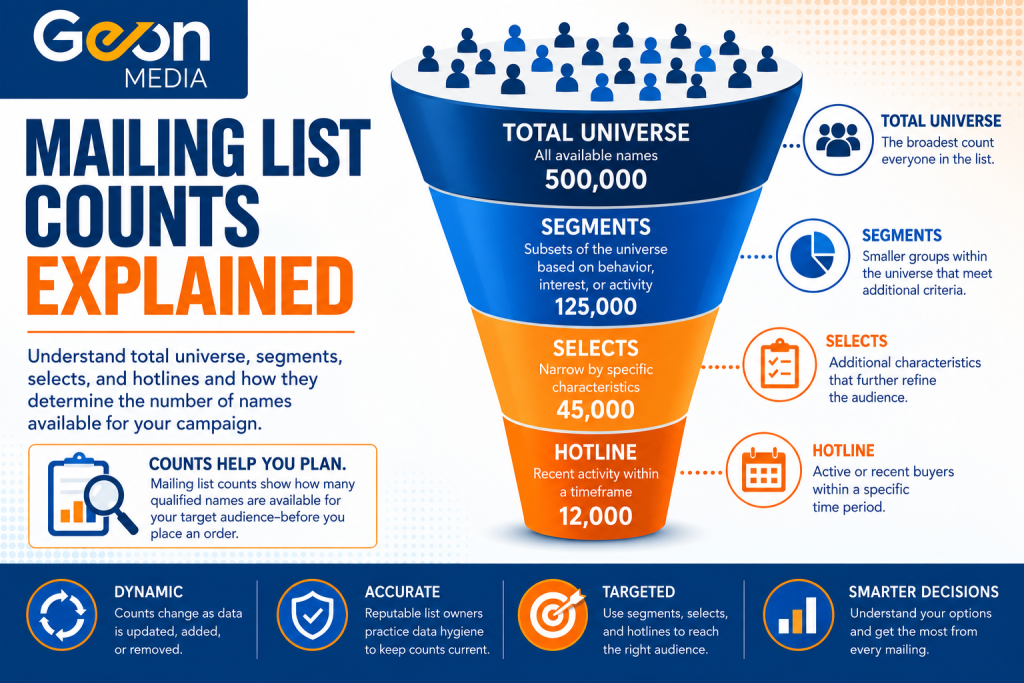
- Mailing list counts help to tell a campaign manager how many records are currently available that meet a certain set of criteria, depending on the mailing list.
- The total universe of a mailing list is the broadest count, while segments, selects, geography, and other criteria can reduce the overall count of names.
- Mailing list counts represent availability at a particular point of time, and change as the mailing list owner’s database gets updated.
Introduction
When looking at a mailing list for the first time, you might see several different numbers that are listed on the mailing list’s counts section. There might be a total universe of one million names, a monthly hotline of ten thousand names, or different counts that are based on criteria based on age, interests, income, geography, or other criteria. So, which number represents the maximum number of names that you’re able to order?
What Are Mailing List Counts?
Mailing list counts are the total number of individuals that are currently available that meet the criteria of a specific mailing list or portion of that list. For example, a mailing list that is consisting of sports enthusiasts would contain records of individuals that have been identified as having an interest in sports based on the data sources and methods that were used to build the list. The full number of people on the mailing list are what is known as the “total universe” of the mailing list.
The total universe will fluctuate based on what data the mailing list owner has available to them. If the mailing list owner has a new source of data offered to them, the total universe might increase. If the owner has their access to a data source revoked, the total universe might decrease. For more information on why a mailing list’s total universe might change, read Geon’s article on that topic here.
Why Are There Multiple Mailing List Counts on the Same Mailing List?
As mentioned, the total universe is the full number of individuals that are on a specific mailing list. However, there could be multiple mailing list counts on some lists, as those counts have additional pieces of criteria attached to them that the total universe does not.
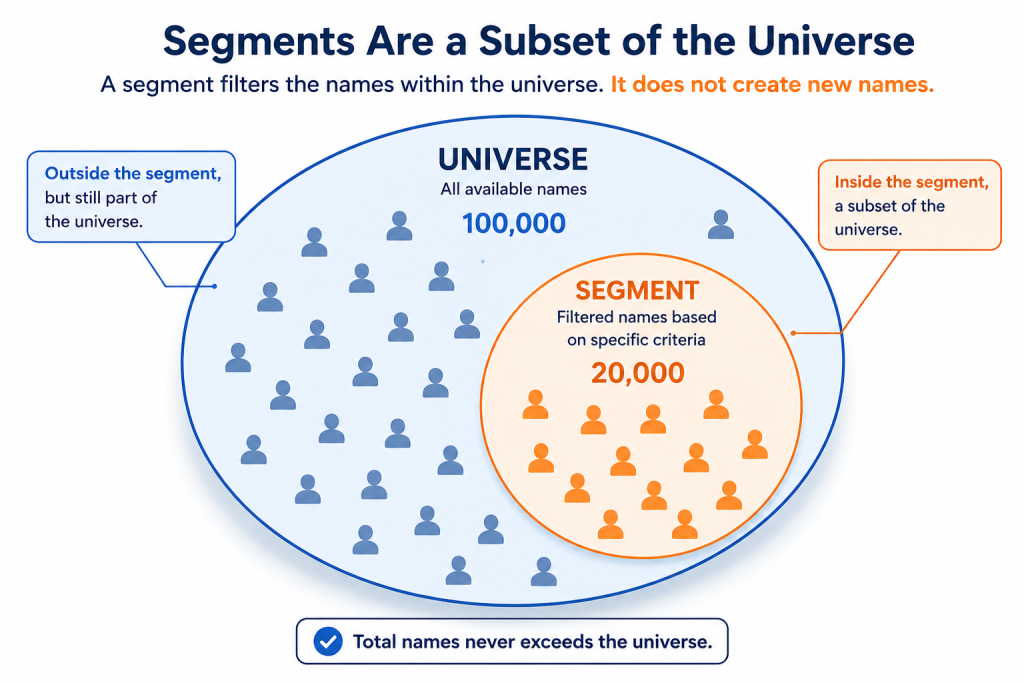
For example, let’s go back to our sports spectator mailing list that was mentioned above. While the total universe is individuals that are interested in a sporting event of some kind, there might be individuals that are interested in only a particular sport, which would require an additional count just for them, which is known as a segment. Segments are subsets of the total universe that meet the initial criteria, as well as a piece of criteria that is exclusive to them.
Other types of segments include active consumers within a certain timeframe, which is known as a hotline. On our sports spectating example, if the option was offered by the list manager, you could get sports fans that purchased tickets to attend a football game within the previous quarter. By adding in a hotline that has an activity condition like this, the mailer can know that the mail piece will be going to someone who has been recently active, which can increase the likelihood that that consumer will engage with the mail piece. For more information on segments, read more about them here.

How Do Selects Affect Mailing List Counts?
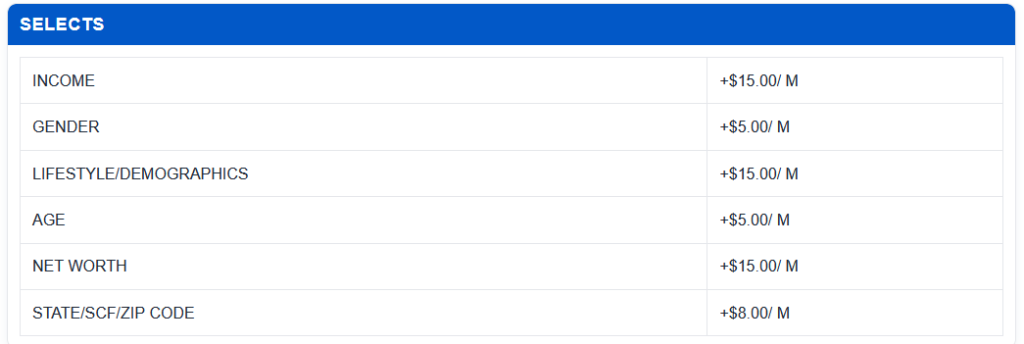
One other piece of information that you might have an impact mailing list counts are what is known as selects. A select is a piece of criteria that a mailer can use to help narrow a mailing list’s universe down based on characteristics such as age, income, gender, homeownership, interests/hobbies, or geography.
As an example, let’s say there was a mailing list with a total universe of 500,000 people. If a mailer only wanted to target individuals who owned a home, the total available count might drop to 300,000 people. If the mailer wanted to add an age range select to their order, the count might then drop to 100,000. If an income requirement was added on top of that, the count might drop to 25,000 people. With every additional criteria added to a mailing list, the number of qualified consumers is going to drop.
These can help to give the mailer a more general idea on who the contents of the mailing list are. If the mailer wants to only target consumers that are of a certain gender, income bracket, or age, adding a select onto their mailing list order can help immensely with this. For more information on selects and their use applications, read Geon’s article on them here, as well as learning about how to choose a select for your rented mailing list order.
Can I Order the Entire Mailing List Universe?
The total universe on a mailing list represents the broadest count available, but the quantity available at a time might depend on the list’s terms, availability, requested geography, selects, or other criteria. A mailer might not want to order every name that is in the total universe, even if they’re able to.
How Do I Read a Mailing List Datacard?
A mailing list datacard provides information regarding the mailing list counts, the list’s available records, pricing, selects, segments, source(s), updating schedule, description, and more. The total universe on the datacard shows the broadest number of total records available, while the segment section might show records in smaller groups that meet an additional requirement that the total universe doesn’t have.
The selects section shows additional criteria that might be available for narrowing down the list. The “counts through” date will indicate how current the published counts are. When you’re evaluating a datacard, looking at these sections and overall mailing list counts can help determine whether or not the mailing list is able to reach your desired target audience.
FAQ
- Q: Are mailing list counts exact at any given time?
- A: Mailing list counts represent the total records that were available when the count was generated but shouldn’t be treated as permanent. Data is constantly getting updated, and due to a mailing list owner gaining/losing access to a data source, consumer tastes changing, or other reasons, mailing list counts might be higher or lower depending on the day. Just because a count might change, that doesn’t mean that the list is unreliable, that is just how mailing lists are structured. Learn more about how mailing lists are built here.
- Q: Can I tell when a mailing list was last updated?
- A: Yes, the “counts through” date shows how current the published counts are. As an example, if a counts through date shows July 2026, that was using data that was available through that period.
- Q: Does getting a count from a mailing list cost money?
- A: No, getting a count doesn’t cost the prospective mailer any money. However, depending on the platform that you are using, the count request could cost the list manager money. If you’re interested in requesting a count from any of Geon’s lists, contact us here.
- Q: Does adding a segment or select to my mailing list count add additional names that weren’t on the mailing list before?
- A: No, adding a segment or select doesn’t add names. All the names that are under a specific segment or select were already on the mailing list, they just have an additional set of criteria attached to them that the remainder of the names do not have.
Conclusion
Mailing list counts help you to determine whether a list has enough prospects that fit a certain number of criteria before you place an order. Understanding what the total universe, segments, selects, and counts through date all mean can make it significantly easier to compare mailing list counts and their contents, and determine which list fits your target audience the best.
Not sure how many prospects are available for your campaign, who your target audience is, or if you should add any selects or segments to your mailing list order? Contact Geon today, and we can help you to obtain a count based on your targeting criteria.
Geon reviews your intended audience and mail piece to identify additional criteria that can help refine your mailing list selection. This helps us select names that more closely align with your offer and campaign goals.
Learn why mailers choose Geon Media.
How Ordering Works
1. Tell us about your campaign. Share your intended audience, quantity, and a sample of your mail piece.
2. Review your options. We help you choose a mailing list and any suitable selects or segments.
3. Confirm your order. Review and approve the final pricing and rental terms.
4. Receive your list. We prepare your selection and deliver you with a spreadsheet containing your mailing list.
Learn more about ordering a mailing list.
New to Direct Mail?
Are you running your first direct mail campaign?
Read Geon’s beginner’s guide for to direct mail here.
Return to Mailing List Fundamentals, or browse Geon’s Learning Center.
Recent Comments